 muse wonder
muse wonder AI Anime Video Generator for original character moments
An anime scene can begin with a glance, a small discovery, or a quiet change in the weather. The muse wonder AI Anime Video Generator uses MiniMax H3 Max Turbo to explore original scenes from text or an opening illustration. Give the muse wonder AI Anime Video Generator a character moment rather than asking a short clip to carry an entire episode.
Video workspace
A gentle jog under cherry blossoms
29/45View prompt
Create an original anime-style five-second scene of an adult woman jogging slowly along a cherry blossom path. Keep her relaxed expression, modest running rhythm, and clear full-body silhouette readable. Use delicate linework, restrained cel shading, soft morning light, and gently drifting petals. Follow with a subtle camera movement while maintaining one continuous setting and no written text.
Introduction
Give the muse wonder AI Anime Video Generator a specific moment
A focused muse wonder AI Anime Video Generator brief connects character, action, and setting before adding spectacle or elaborate background detail.
Begin with a small discovery
An adult rooftop botanist notices a glowing seedling and leans closer. That gives the muse wonder AI Anime Video Generator a visible event and a readable reaction.
Describe original visual traits
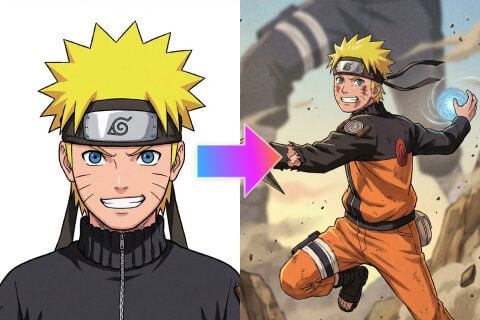
Give the character a practical jacket, a distinctive hairstyle, and one meaningful accessory. Ask the muse wonder AI Anime Video Generator for clean linework and restrained shading. Describe those qualities directly rather than relying on a recognizable franchise character to supply the entire identity.
Choose the appropriate starting point
Text mode invents the scene from your brief; image mode starts from one uploaded illustration with an optional ending image. The muse wonder AI Anime Video Generator uses the same Turbo model for these tasks, not an undisclosed anime-only engine or an automatic episode builder.
How to use
How to use the muse wonder AI Anime Video Generator
- PromptSTEP 1
Choose your opening
Choose MiniMax H3 Max Turbo in the muse wonder AI Anime Video Generator, then start from text or one opening illustration.
- ModelMiniMax H3 Max Turbo480P16:95sPromptSTEP 2
Direct the performance
Give the muse wonder AI Anime Video Generator a small character action, clear facial direction, restrained camera movement, and relevant environmental sound.
- First frameLast frame
 0.0s
0.0s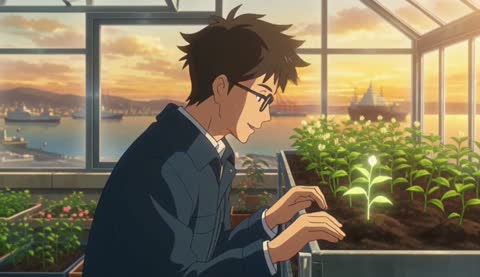 2.6s
2.6s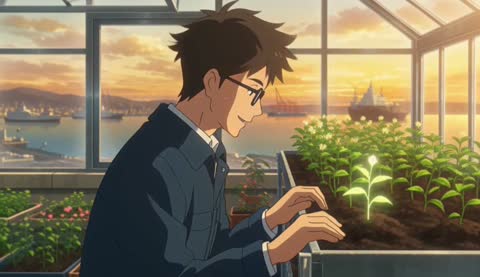 4.7sSTEP 3
Create the first draft
Start the muse wonder AI Anime Video Generator at five seconds and 480P, review framing and displayed credits, then generate the scene.
- Five-second original anime-style scene. An adult botanist in a navy field jacket notices one glowing seedling on a rooftop greenhouse bench, leans slightly closer, then smiles softly. Steady medium view, clear hands, restrained hair movement, clean linework and simple cel-like shadows. Warm sunrise above a distant harbor. Light wind and leaves rustling, no dialogue or captions.DownloadSTEP 4
Check the full sequence
Inspect muse wonder AI Anime Video Generator expressions, hands, costume details, and audio throughout the clip before refining or downloading your chosen version.
Features
Build readable muse wonder AI Anime Video Generator characters
Your muse wonder AI Anime Video Generator subject needs an understandable face and silhouette while moving, not just detailed styling in a still frame.
Keep facial direction clear
Describe where the character looks and how far the head turns. A slight glance toward a light is easier to inspect than a rapid spin. Give the muse wonder AI Anime Video Generator a readable facial angle before adding elaborate hair movement or strong shadows.
- Keep the eyes visible during the main expressive beat.
- Ask the muse wonder AI Anime Video Generator for restrained movement around the face.
Limit costume distractions
Choose a few defining elements, such as a navy jacket and coral scarf, rather than many straps and ornaments. This gives muse wonder AI Anime Video Generator review a clear checklist.
Specify a consistent drawing language
Ask for fine dark outlines, simple shadow shapes, and a softly painted environment. Give the muse wonder AI Anime Video Generator a coherent treatment rather than mixing photographic skin with flat clothing and unrelated rendering styles.

Shape muse wonder AI Anime Video Generator expression and timing
An effective muse wonder AI Anime Video Generator scene gives the character time to notice, respond, and settle within one short action.
Use gaze before a larger gesture
A character can look toward a sound before turning slightly to investigate. Explain that order to the muse wonder AI Anime Video Generator. It gives the response a reason and makes the movement feel connected to something in the scene instead of arriving without context.
- Choose one cause for the character’s change in expression.
- Give the muse wonder AI Anime Video Generator a pause after the important reaction.
Make the action physically readable
For a hand reaching toward a seedling, keep the plant and hand clearly separated at the start. Ask the muse wonder AI Anime Video Generator for a small movement with a visible destination.
Let secondary motion follow
Hair tips or a scarf can move after the head turns. Describe that supporting movement without making it the central event. The muse wonder AI Anime Video Generator should have a hierarchy of motion so flowing fabric and floating particles do not hide the character’s performance.
Give muse wonder AI Anime Video Generator scenery a supporting role
Use the muse wonder AI Anime Video Generator environment to establish place and depth while keeping the expressive action easy to follow.
Arrange three readable layers
A greenhouse railing in front, the character beside a plant, and a distant harbor create a clear spatial arrangement. Describe those relationships to the muse wonder AI Anime Video Generator.
- Keep background structures quieter than the character’s face and hands.
- Check muse wonder AI Anime Video Generator perspective when the camera begins to move.
Choose weather with visible effects
A light sea breeze can move leaves and a loose sleeve; morning haze can soften distant buildings. Give the muse wonder AI Anime Video Generator those specific effects.
Protect the character’s route
If the character takes one step, describe the clear area where the foot lands. The muse wonder AI Anime Video Generator should receive a coherent space for that action.
Frame muse wonder AI Anime Video Generator scenes for their destination
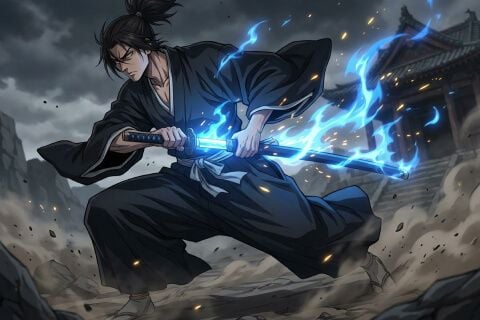
Composition and audio should serve the same moment. Give the muse wonder AI Anime Video Generator a viewing context before choosing camera movement.
Choose wide or vertical staging
Text mode starts at 16:9, and 9:16 can suit a vertical character scene. In image mode, the source controls proportions. Pla muse wonder AI Anime Video Generator framing around the gesture, leaving enough room for the face, hands, and relevant environment to remain visible.
Keep the camera purposeful
Try a steady medium view for a reaction or a gentle push toward a discovery. Tell the muse wonder AI Anime Video Generator where the camera begins and how it moves. A short emotional beat rarely needs a simultaneous orbit, zoom, and dramatic angle change.
Write an atmospheric audio cue
Turbo creates native audio. Ask the muse wonder AI Anime Video Generator for wind through leaves, a soft footstep, or a distant harbor sound. Exact dialogue and mouth timing should not be assumed from a written instruction.

Review muse wonder AI Anime Video Generator continuity before expanding
Watch the whole muse wonder AI Anime Video Generator result before selecting it. A beautiful opening does not reveal every change during the performance.
Inspect the acting interval
Check the face, hands, clothing, and featured object during the largest movement. The muse wonder AI Anime Video Generator may alter drawing details or proportions as the shot develops.
Use an ending frame selectively
An optional ending illustration can show a reachable final pose. Explain the movement between it and the opening. The muse wonder AI Anime Video Generator still needs review through the middle of the clip; matching endpoints alone would not establish a convincing performance or stable character.
Refine the successful direction
Start at five seconds and 480P; Turbo supports five to fifteen seconds and 480P, 768P, or 1080P. Check displayed credits before each muse wonder AI Anime Video Generator request.
Example prompts
Rooftop botanist at sunrise
Five-second original anime-style scene. An adult botanist in a navy field jacket notices one glowing seedling on a rooftop greenhouse bench, leans slightly closer, then smiles softly. Steady medium view, clear hands, restrained hair movement, clean linework and simple cel-like shadows. Warm sunrise above a distant harbor. Light wind and leaves rustling, no dialogue or captions.
Image mode: a quiet station reaction
Use the uploaded original character illustration as the opening frame. Over five seconds, the adult traveler hears a distant arrival sound, glances toward the platform, and gently tightens one hand around a canvas bag strap. Keep the camera steady and the gesture small. Soft evening light, subtle coat movement, quiet station ambience. No new characters, dialogue, captions, or rapid cuts.
User reviews
muse wonder video creator feedback.
muse wonder creator reviews

I made a full character PV for my game with muse wonder MiniMax H3 in one afternoon. The menu UI stayed readable in every frame and the character never went off-model. That used to cost me a contractor and three weeks.

We tested every muse wonder AI video generator on the market for stylized work. H3 is the only one that held our anime style across cuts. We now use it for pitch reels and animatics on every project.

I uploaded four product photos and got a listing video with music and a voiceover the same day. My click-through rate on the new listings is up 38%. H3 even got the label text on my packaging right.

I ship five vertical videos a week for three brands. muse wonder MiniMax H3 gets me from brief to draft in under an hour, with sound already synced. My old workflow needed a videographer and two review rounds.

The editing side is what sold me. A client wanted the background of an interview changed — I typed one sentence into muse wonder MiniMax H3 and the lighting on the subject matched the new scene automatically.

I previsualized my entire short film in muse wonder MiniMax H3 before we shot a single frame. Rack focus, match cuts, even the title cards — it understands director language, not just keywords.
muse wonder MiniMax H3 Max Pricing and Credit Plans
Cancel anytime
Lite
50% off0.025 / credit
Billed $ yearly179· Save $179.8
Video Models



Image Models



- Includes muse wonder MiniMax H3 and all premium models
- Up to 1 batch generation task
- Standard generation speed
- Standard generation success rate
- Standard customer support
- Commercial Use License
Standard
50% off0.017 / credit
Billed $ yearly299· Save $299.8
Video Models
Image Models
- Includes muse wonder MiniMax H3 and all premium models
- Up to 4 batch generation tasks
- Priority processing speed
- High generation success rate
- Priority customer support
- Commercial Use License
Pro
50% off0.014 / credit
Billed $ yearly599· Save $599.8
Video Models
Image Models
- Includes muse wonder MiniMax H3 and all premium models
- Up to 10 batch generation tasks
- Fastest generation speed
- High generation success rate
- Dedicated account manager
- Commercial Use License
Max
50% off0.012 / credit
Billed $ yearly1,199· Save $1,199.8
Video Models
Image Models
- Includes muse wonder MiniMax H3 and all premium models
- Up to 10 batch generation tasks
- Fastest generation speed
- High generation success rate
- Dedicated account manager
- Commercial Use License
Pay safely and securely with























FAQ
Frequently asked questions
Do I need artwork for the muse wonder AI Anime Video Generator?
No. You can begin in text mode with an original character and scene description. Use image mode when you already have an illustration that should establish the opening composition, optionally adding a compatible ending image.
Can the muse wonder AI Anime Video Generator make vertical scenes?
Yes. Choose 9:16 for a vertical text-generated scene, or prepare a vertical opening illustration for image mode. Stage the character and action inside that composition rather than assuming a wide scene can be cropped without losing important details.
Will the muse wonder AI Anime Video Generator keep a character identical?
No exact continuity is guaranteed. Keep a clear design brief and use an approved opening illustration when appropriate. Compare facial features, costume shapes, and accessories throughout each clip before grouping separate results into one character sequence.
How should I describe the visual style?
Give the muse wonder AI Anime Video Generator concrete qualities: expressive linework, restrained cel-like shadows, muted clothing colors, and atmospheric painted scenery. A focused description helps you assess the result without relying on a named franchise or an assumed built-in style preset.
Can I make a complete episode in one request?
Treat the muse wonder AI Anime Video Generator as a short-shot workflow within the supported five-to-fifteen-second range. Plan separate moments with clear actions and endings, then assemble selected clips elsewhere. One prompt is not a complete episode production system.
CTA
Direct a moment with the muse wonder AI Anime Video Generator
Choose an original character, a readable gesture, and a setting that supports the emotion. Review your configuration and displayed credits, then create a short scene to watch and refine.
Create an original anime scene